

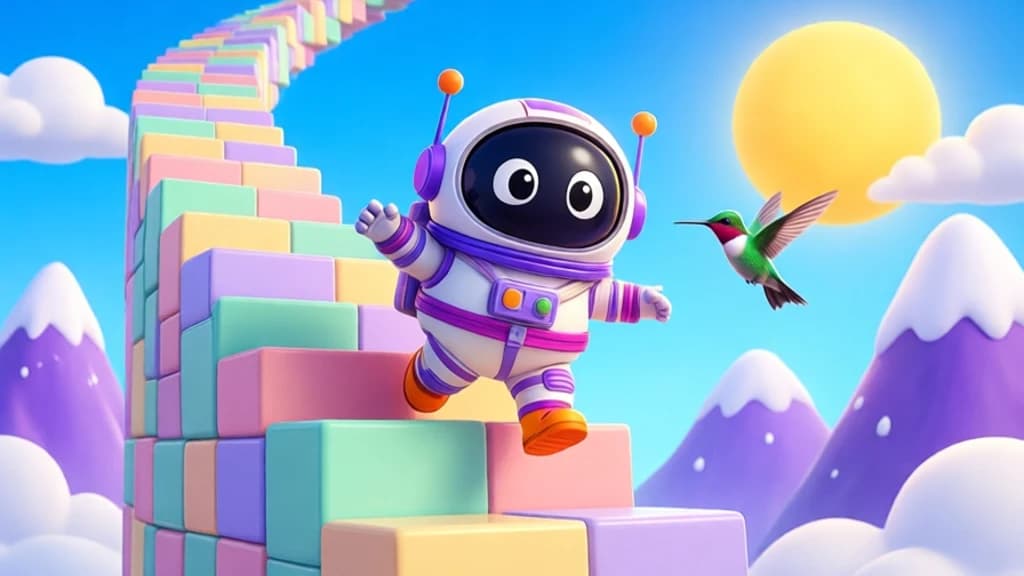
What your viewers can do
- An astronaut climbs a 1,000-step tower
- 9 animals push him up, 9 knock him down
- Hold the top for 10 seconds to win
- Victories, crown and end-of-game podium
Setup
Download SyncLive, open the Games tab and choose SyncStairs. The app installs what's needed and guides you step by step.
Make SyncStairs interactive in 3 steps
- Install SyncLiveFree, on your computer. No credit card.
- Connect your streamTikTok LIVE or Kick: your username is all it takes, no password.
- Pick SyncStairsThe gift pack is already set up: tweak it and test it before you go live.
FAQ
How do I make SyncStairs interactive on TikTok LIVE?
SyncStairs is our in-house giant staircase game: an astronaut climbs a 1,000-step tower during your live, and your viewers decide his fate. A hummingbird, kangaroo, basketball gorilla, Pegasus or sumo push him up; a seagull, raccoon, knight, golem or black dragon knock him back down. Hold the top for 10 seconds to win a victory and the crown. It installs and launches in one click from the app. Included with SyncLive Pro. Just install SyncLive, connect your stream and pick SyncStairs in the Games tab.
Is SyncStairs free with SyncLive?
SyncStairs is included in SyncLive Pro (€25.99 / month). It isn't available on the free account.
Does it work on Kick too?
Yes. SyncLive connects to TikTok LIVE and Kick: gifts and events from both platforms can trigger the effects in SyncStairs.
Can I test the effects before going live?
Yes. The app's simulator sends fake gifts so you can check every effect before you go live.
More games




Bring SyncStairs to your live
Included in SyncLive Pro. The app itself is free.
⬇ Download SyncLive for Windows